
Building a Free, No-Code AI Automation System with ActivePieces & Discord

If you’ve ever used Zapier, Slack, or an AI agent to manage work, this article is for you.
I hacked this automation system together to handle notifications, knowledge management, and automation in a central, collaborative place that costs nothing to run.
Why did I build such a thing? It all started a year ago. With all the hype around AI, I decided it was time to get serious about automation.
I wasn’t looking to generate images. I was looking to manage my work life better and automate tasks. After a few years of founding a company, I was drowning in a sea of tools. I knew there was a coming wave of AI automation, and I wanted to learn the basics of automating tasks.
So, I set off on my quest for a personal operating system that would unite and automate all of the notifications, connections, and bots that can take me into the age of AI….A single place where I could see everything I do as a founder, researcher, and designer.
What I Wanted from an Automation System

Not everybody needs this kind of system.
Most will be good with a few Zapier integrations. But if you want to get serious about automation, you need a system that can handle the full spectrum of AI tools that won’t break the bank.
Why did I need an automation system?
- I hate using email. It feels like the spam never ends. Some tools can help (check out Leave Me Alone) to fight the spam, but it’s only a matter of time before it gets out of control. Since starting the Fountain Institute blog, I’ve been inundated with cold-call sales emails and backlink requests. It feels like the spam never ends, and I wanted to take control of it.
- I can’t miss critical business notifications. I run a small online school called the Fountain Institute, and I want to be notified immediately when someone fills out a customer feedback message or books a call with me. I wanted a dashboard-like experience to see mission-critical notifications and some way to tag their status.
- I don’t want spammy notifications, so I turn off all non-human notifications on my phone and computer. I do this because I want control over my attention. I don’t want some growth team notifying me just to boost their quarterly numbers. Sometimes, I miss things because of this, but I’m usually willing to take that risk to pursue a purpose-driven user experience with my tech.
- I needed a central place to manage multi-tool workflows. As a bootstrapped founder, I used multiple cheap tools from different companies to deliver my service. Bootstrapped founders get used to looping tools like a guitarist with a board of guitar pedals. For example, I needed four tools to register a new customer completely, but I didn’t have an interface besides email that tracked everything.
- I wanted to automate work using bots and AI agents. AI’s interface is often text-based and browser-based. Some of the newest AI tools, like Midjourney and ChatGPT, don’t talk to each other or play well with other tools (for now). I wanted something that would bring multiple AI models together in a single place.
- I didn’t want to pay monthly fees. I hate subscriptions more than I hate email. I will gladly settle for a less useful tool if there is a lifetime payment option or a free, open-source alternative. As you’ll see, there almost always is an open-source option (try Open Alternative for a nice list of free tools).
- I wanted a system that could scale to an entire product team. I hoped this experience would help me manage research operations at organizations that need to automate product discovery. Therefore, it was essential that I could do this not just for myself but also for the entire product team.
- I wanted a tool for life, not just work. Email and productivity tools are just so dull. I wanted a place to send myself a quote, a recipe, or an image I liked. I could use Notion, Evernote, or message myself, but I didn’t want a separate tool. And most tools are organized for work or pleasure, not both.
There might be some custom solution that could do all of this for the price of a Macbook Pro every month, but that’s not the kind of budget I had.
As you’ll see, it’s possible to do it for free, thanks to the magic of free trials and **open-source software,**at least for now.
My Personal Automation System
After trying out a few tools, I ended up with something that I use every single day.
Here is a birds-eye-view of my system:
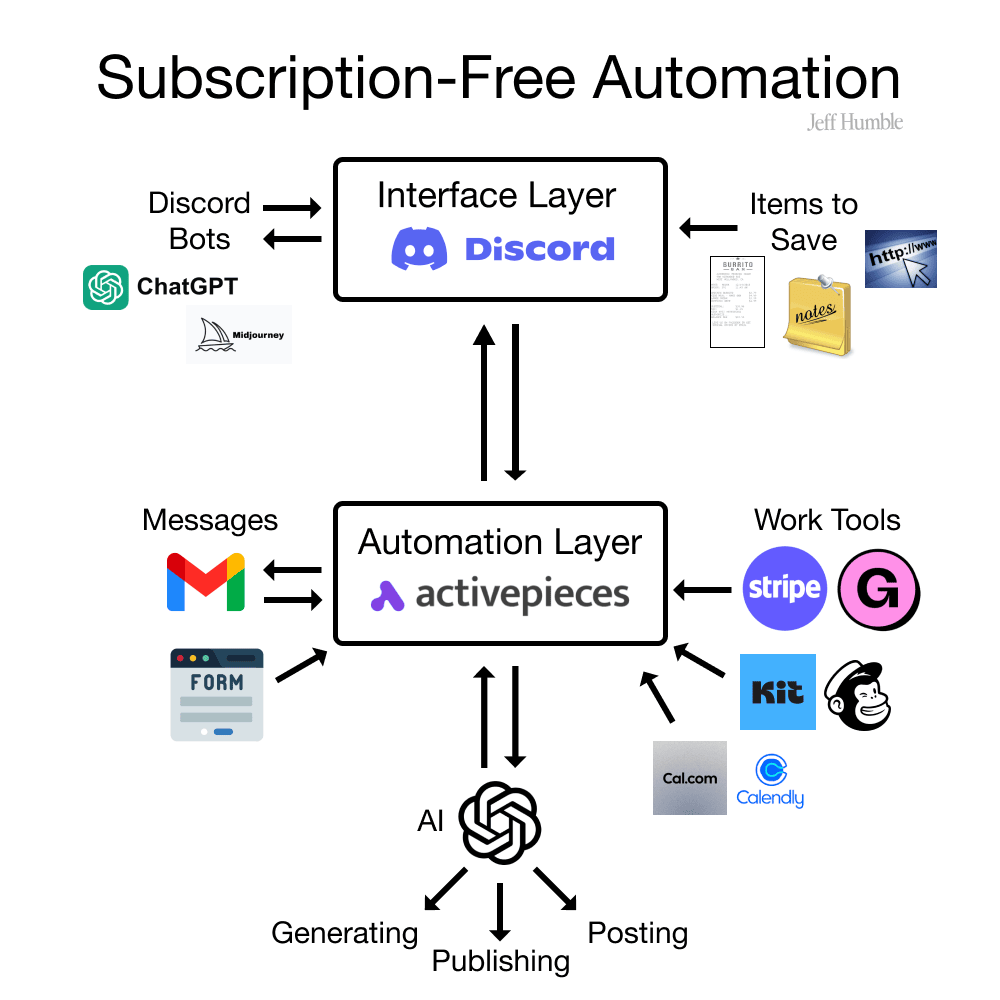
It’s a private Discord account with hyper-specific channels connected to various tools in my tech stack that Activepieces, an open-source automation platform, pulls into Discord.
The Discord is the first thing I check in the morning, and I love how I can tweak the notifications so that I only get notified from my Discord. When I hear the Discord noise on my computer, I know something important has happened. I certainly can’t say that about email or Slack because others can message me on a whim.
Here is a screenshot of the current setup in Discord where I am the only user:
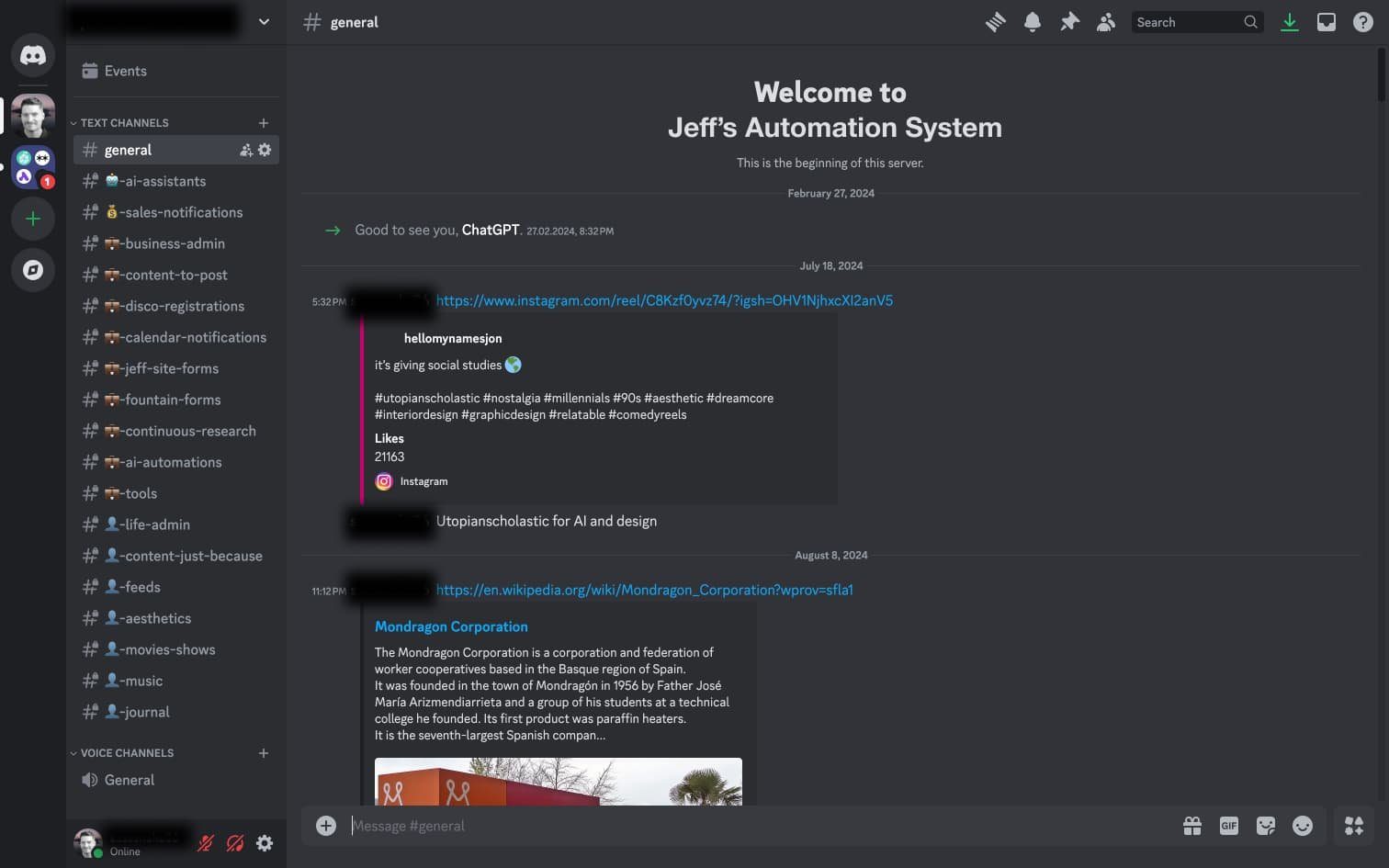
💼 = work stuff and 👤 = personal stuff
At the moment, this system is just for me, but it would cost nothing to add dozens of people to this Discord server. I like that it has the ability to grow, but that I can experiment in private to learn the system.
Channel Breakdown
Each channel is a working prototype of something I’m trying to archive or automate. It’s way easier to handle than browser tabs.
Here is a breakdown of the channels I’m experimenting with:
- # 🤖-ai-assistants - pulls in AI Agents from Chat GPT that I can chat with in Discord
- # 💰-sales-notifications - pulls in any sale in Stripe
- # 💼-business-admin - a feed where I put receipts & other docs I need to save (for taxes)
- # 💼-content-to-post - a feed where I save ideas & memes I want to post on social media
- # 💼-disco-registrations - pulls in notifications for students registering for my course
- # 💼-calendar-notifications - pulls in notifications of people booking me on Cal.com
- # 💼-jeff-site-forms - pulls in form submissions on my personal website
- # 💼-fountain-forms - pulls in form submissions on the Fountain Institute
- # 💼-continuous-research - pulls in user interview appts. & data submitted in surveys
- # 💼-ai-automations - status updates on AI-powered automation from Activepieces
- # 💼-tools - a feed where I post new tools I’m interested in using
- # 👤-life-admin - a feed where I pull in appts. or important papers (a must if you live in 🇩🇪)
- # 👤-content-just-because - an image/video I want to save, often from social media
- # 👤-feeds - announcement channels in other Discords & RSS feeds I want to follow (in Discord you can mute a single channel if your RSS feed starts to feel spammy)
- # 👤-reading-list - Here, I drop links to books and articles I want to read
- # 👤-aesthetics - I use this one like an ad-free Pinterest board
- # 👤-movies-shows - I use this to drop links for content on 123movies or YouTube
- # 👤-journal - I use this to send thoughts and learnings to myself like a diary
Many of these channels came about because I was messaging myself a link and thought, “Maybe I should have a dedicated place for this?” The rest are inspired by different things that Activepieces can do.
Tagging Content with Emojis to Indicate Status
Any item in any channel can be further tagged to give it a status for something with an emoji.
I mainly use emojis to tag Activepieces automations that makes it into my Discord. I use this to keep track of where customers are in their onboarding. Any emoji can become a tag to keep track of the customers’ status.
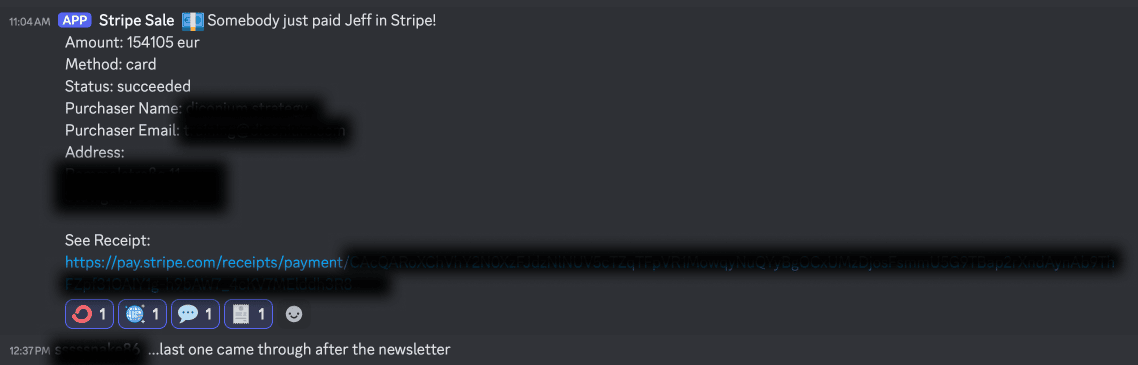
Example of a sale in Stripe with emoji tags to indicate onboarding status
Above, you can see a Stripe sale for Defining UX Strategy: LIVE, a course I teach at the Fountain Institute. Since this record is saved indefinitely in my Discord, it works as a sales record I can search through without email. Again, I hate email, and I love adding little notes about each sale that I can use to improve my marketing.
I use emojis to indicate whether or not I’ve done specific manual actions. I use a different marketing, sales, product, and accounting tool because I don’t have a dev that can connect all these tools automatically. I use these four emojis to indicate my onboarding actions on every sale.
The 🧾 indicates that I’ve created an invoice for the sale in Accountable, my accounting tool. The 💬 indicates I’ve sent the new customer a welcome message in the learning platform.
I know that I could automate more and more of this in the future. I think manual efforts and manually adding tags is far from automated, but at least I can trust that the task has been done when I see the emojis. You could use this kind of emoji-as-a-tag system for pretty much anything that Activepieces can pull into Discord.
What I do with Discord + Activepieces:
- Notification of sales & registrations, i.e. new Stripe or Gumroad sales
- Notification of inbound leads, i.e. new subscribers in Kit or Slack
- Notification for anything that involves a form
- Notification for anything that can be sent in an email, i.e. subscription reminders
- Continuous research notifications and automation, i.e. calls booked for research studies
- Dedicated channels for work or life archive of documents, links, and reminders
- Feeds from other Discord servers and content I like, i.e. updates to Activepieces or Are.na
- Dedicated channels for anything I used to send to my phone, i.e. posts from Instagram that I want to open on my laptop
- Dedicated AI chat in a specific way within a particular channel
- More AI integrations to come
To get a full list of what Activepieces can do, they have a nice little database here. It should get your mind going with the possibilities.
The AI integrations are still a work in progress. Since I can use both AI bots in Discord and AI integrations in Activepieces, I feel confident this system has room to accommodate any AI integration I want.
Activepieces can integrate ChatGPT, andthere are lots of videos available on how to do it. As of January 2025, we’re all still waiting for AI to play well with tasks in the browser like the Large Action Model (LAM) Rabbit is working on. I imagine an AI from Open AI or Apple will get access to tasks on the computer sometime in 2025, but automation platforms are the easiest way to automate something without code for now. If you know of something that would help me here, drop me a comment!
Why I like Discord more than Slack
While Slack is more user-friendly, the free trial in Discord is way better than Slack. Slack’s free trial only lets you see your messages from the past three months, which won’t do for archiving business info such as receipts and invoices. Discord’s free trial gives the average user unlimited storage. I hope Discord keeps this feature of the free trial, as it makes the comparison a no-brainer compared to the eight bucks a month per user that Slack charges for unlimited storage. You can even self-host a Discord if you need a complex, corporate use case.
Discord also feels more adaptable and open-sourced than Slack, including a million ways to personalize and automate the experience. In addition to the tools you love, hundreds of Discord-specific bots can be used to customize the experience if you’re willing to dig through the giant list of apps.
Why I like Activepieces more than Zapier
Activepieces is free for simple setups with 1,000 free runs a month. And if that ever changes, you can self-host and pay nothing for unlimited runs. While Zapier has more integrations and is more user-friendly, it’s one of the most expensive providers. I have difficulty paying $20 a month when a free alternative exists that does almost everything Zapier does. Activepieces is an excellent open-sourced alternative to Zapier if you don’t mind a little fiddling to get it to work.
The interface is very similar so that Zapier fans can jump right in. Even though the tool is open-sourced, it’s still actively supported, with new integrations dropping weekly.
Features of My Automation System
I like what I can do so far with my system, even if it’s lo-fi. Here is what I love about it:
- No spam, just my stuff
- I can use emojis to make up my own tag system, i.e. A stripe sale in Discord can be tagged once the customer is onboarded
- Searchable archive of content that doesn’t disappear
- It can be used with Mac, PC, Android, iOS, etc.
- Growing list of app integrations in Activepieces
- Can add collaborators in Discord without costing more money
- It can be self-hosted to be more scalable & sustainable
- It plays well with AI
- Infinitely adaptable: just add a channel and connect a bot/automation
The next step would be to move to something more app-like that is custom to my work, but I don’t think it’s worth it. So far, I have been able to set up my Activepieces integrations in a few hours per automation. I’m not ready to commit to a more polished system that only I’m using.
Alternatives to Discord
You certainly don’t need to use Discord to make this kind of system work. If your employer already uses another tool like Slack, you might find it easier to use that instead.
Here are some alternatives to Discord:
- Slack - good if your company is already using this
- Notion - good if you want a more dashboard-like experience, long-form content, or more notifications with less automation
- AirTable - good if you want to turn this into a custom app with other no-code skills such as for a client
I’ve found that the tool you check more often is usually the better interface layer, so use the tool you’ve already got if you can.
Alternatives to Activepieces
Activepieces is more of a learning curve than established tools like Zapier. If you need customer service or detailed guides, try some of these paid options:
- Zapier - has the most integrations
- Make - has a lot of new AI stuff
- Integromat - seems pretty standard
- PabblyConnect - has a lifetime version but seems complicated
- IFTTT - limited but a good place to start
In-House Use Cases for an Automation System

Not everyone will need their system to work like mine, but there are many reasons why an in-house employee might need an automation system.
Here are some of the use cases that I’ve seen this type of system work:
-
Business Automation
This is the main use case and how I use my automation system. If it’s important, I want it to be visible. And if I can automate it without reducing quality,
I probably wouldn’t have built a system like this if I were working in-house. When you’re a founder or a freelancer, the faster you do something, the more money you make. So, there is an incentive to automate that you don’t always see in-house. Of course, you will likely be rewarded for saving people time, and the increase in collaboration for a shared system is absolutely worth the effort.
-
Research Operations
There’s never enough time to do research. An automation system can help you find the time and minimize the admin work. I’ve used a system like this to notify designers of upcoming interviews, gather research notes, and analyze them with AI tools without leaving Slack. The fact that you can bring ChatGPT into a Discord channel will make research analysis effortless.
When you’ve got a big team of busy people, it pays to have a system to manage your continuous discovery habits. I’ve found this to be useful even with two people. You’d be amazed at how confusing scheduling can be, for instance, once you need to manage three calendars.
Tools like Calendly or Cal.com (my preferred choice because it’s free) are adding automation flows directly in the app, but they’ll always have fewer features than dedicated automation tools like Activepieces. Even if you’re a pro researcher, you can get stakeholders to care by making your research efforts transparent using a system like this.
-
Tracking Metrics & Projects
Sharing marketing and sales stats with the whole team using automation setups is a common practice at startups. Sharing departmental data across the org helps reduce silos and gives people real-time data to get better at their jobs.
But it doesn’t just have to be the sales team that sends notifications to the whole company. Using an automation flow, you can send messages as a developer or a designer when things go live. You can even set up a specific channel for every project so that every comment and meeting is archived chronologically. You can even invite clients to be collaborators in a project channel.
You may get some pushback initially, but sharing data is always better for the team. There is no limit to the silos you can break when you give everyone access to company-wide data.
-
Team Hubs
You can use this same setup to run a community of practice within your organization or as a side gig. If your company only uses email for communication, an automation system like this will likely blow them away. You can set up a system in Slack or Discord with lots of automation to bring a specific subset of the company closer via real-time notifications.
You might also find that certain people are very passionate about automating things at your company. Why not start a Discord for your product group and experiment with AI tools? It will give you some interesting things to talk about at the office and build a sense of community at work.
Hire Jeff to Automate Your Product Discovery
See something you like in this article that you’d like for your organization? I have set up systems for research operations for product discovery that can help teams collaboratively manage their “continuous discovery habits.”
In my work teaching product discovery, I have many templates and approaches to save you time, so I can also advise you on how to improve your discovery results.
The beauty of a subscription-free system is that I can set this up for your organization, and it will work forever.
Book a consultation call if you’re interested!
Those are only a few ways an automation system can save time and simplify your work. I’d love to know how you’ve worked to automate stuff like this.
Let me know something you automated and how you did it in the comments below!